Originally published on Medium: OP-TEE from Zero: Part 1
Understanding the Basic Architecture
Summary OP-TEE is a protected mini operating system. Your normal Linux application stays in Linux and asks a small Trusted Application (TA) in OP-TEE to perform security-sensitive work.
1. Problem OP-TEE Solves
Linux is powerful, but it is also a large operating system. Many processes, libraries, drivers, containers, services, and administrators can potentially interact with the system. If a very sensitive secret - such as a private signing key is simply stored and used like a normal Linux file, compromise of Linux may expose that secret.
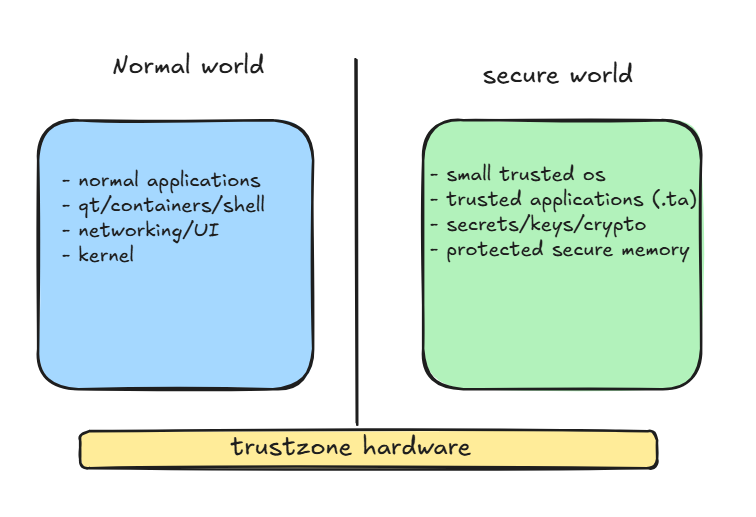
ARM TrustZone provides hardware support for separating the processor into two security domains. OP-TEE uses that TrustZone capability to provide a small trusted execution environment in the Secure World.
Real-world concept mapping with office and vault terminologies:
Think of Linux as the office area and OP-TEE as a locked vault room. Most employees and normal work stay in the office. When something sensitive must happen, the office requests the vault to perform that operation. The vault returns the result without handing over the protected secret.
What Does TEE Mean?
TEE stands for Trusted Execution Environment. It is an isolated execution environment intended for small pieces of security-sensitive code. OP-TEE is an open-source implementation of a TEE that follows the GlobalPlatform TEE APIs.
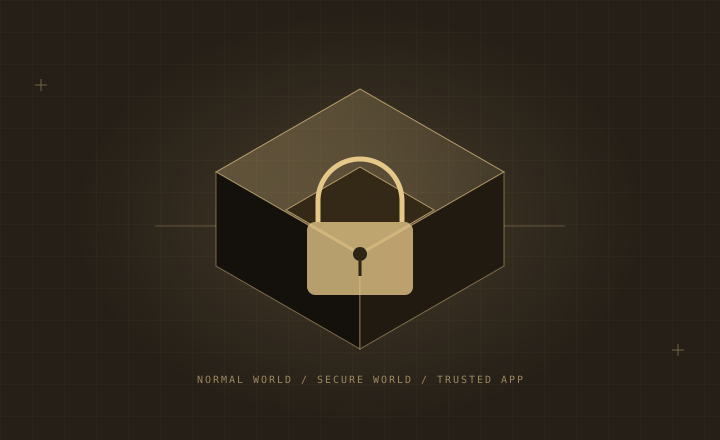
On an ARMv8 processor such as the i.MX8M Plus, the hardware security state is commonly described as Normal World and Secure World. Linux usually runs in the Normal World. OP-TEE runs in the Secure World.
2. What OP-TEE is not
- It is not a replacement for Linux.
- It is not another full desktop/server operating system.
- It does not automatically move your existing Qt, C, C++, Python, shell, or container applications into the Secure World.
- It is not the same thing as Secure Boot. Secure Boot establishes what software is allowed to boot; OP-TEE provides an isolated runtime environment for trusted code.
- It is not intended for large GUI applications, browsers, complete cloud agents, or general-purpose container workloads.
3. Normal Linux Application vs Trusted Application
Linux loads and executes a normal Linux executable. OP-TEE loads and executes a Trusted Application. These are different execution environments and normally use different APIs and build flows.
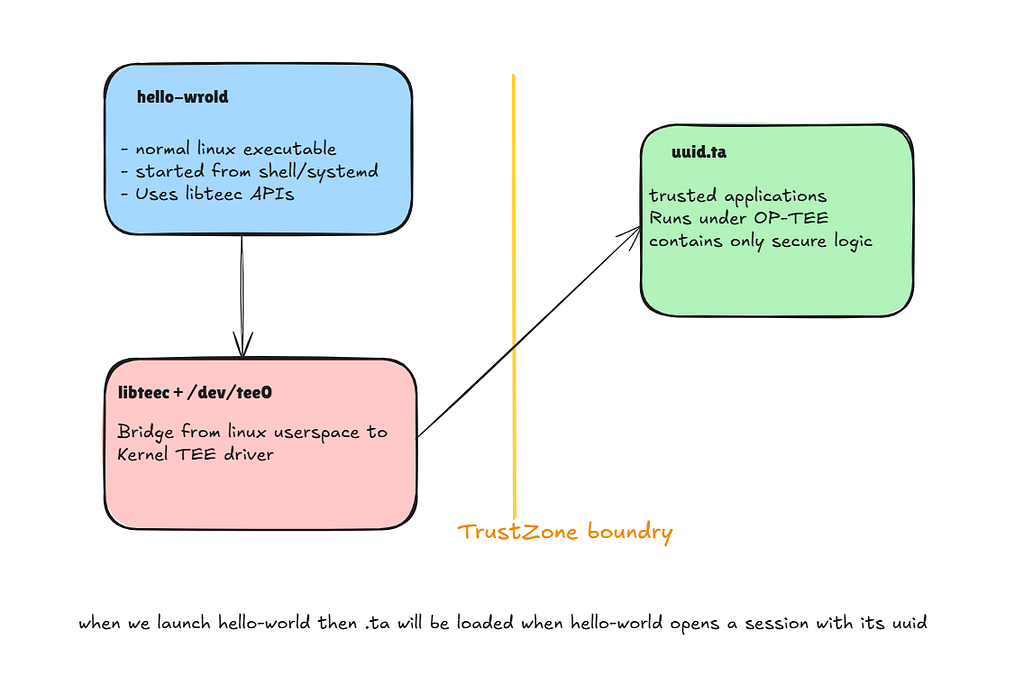
Figure 2 - Normal host application calling a Trusted Application.
3.1 The application is usually split into two pieces
Suppose we want a secure “Hello” example. We normally create a Linux-side host program and a Secure-World Trusted Application.
hello-optee/
 ├── host/
 │ └── hello.c -> /usr/bin/hello-host
 └── ta/
 └── secure_hello.c -> <UUID>.ta
You start only the host executable, for example:
root@device:~# /usr/bin/hello-world
The host application opens a session to a TA identified by a UUID. OP-TEE then loads that TA and executes the requested command in Secure World.
4. What Exactly Is a UUID.ta File?
The files under /usr/lib/optee_armtz with names such as 528938ce-fc59-11e8-8eb2-f2801f1b9fd1.ta are Trusted Application binaries. The long UUID is the unique identity of the TA.
/usr/lib/optee_armtz/
 ├── 25497083-a58a-4fc5-8a72-1ad7b69b8562.ta
 ├── 528938ce-fc59-11e8-8eb2-f2801f1b9fd1.ta
 ├── 873bcd08-c2c3-11e6-a937-d0bf9c45c61c.ta
 └── ...
**Important distinction **The .ta file can be stored on the ordinary Linux filesystem, but it is not executed as a normal Linux process. tee-supplicant helps make the file available, and OP-TEE loads/validates it and runs its code in the Secure World.
4.1 Why use a UUID instead of a normal file name?
The host application does not normally say “run secure_hello.ta”. Instead, it opens a session to a specific TA UUID. That UUID is defined in a shared header used by both the Linux host side and the Trusted Application side. This avoids depending on a human-readable filename and gives every TA a globally unique identity.
4.2 What a TA can provide
A TA exposes a small command interface. For example, a hypothetical security TA could offer commands such as:
CMD_GENERATE_KEY
CMD_SIGN_DATA
CMD_VERIFY_DATA
CMD_STORE_SECRET
CMD_READ_SECURE_COUNTER
The host application asks for one of these commands. The sensitive implementation remains inside the TA.
5. Does Every Application Need OP-TEE Calls?
No. Only an application that needs a service implemented inside OP-TEE has to call the OP-TEE Client API.

5.1 The three client calls to recognize
You do not need to memorize the API yet. At this stage, just attach a simple meaning to these common calls:
TEEC_InitializeContext() -> "Connect me to the TEE subsystem"
TEEC_OpenSession() -> "Open a session to this TA UUID"
TEEC_InvokeCommand() -> "Ask this TA to execute command X"
There are also close-session/finalize calls and parameter structures, but the three above are enough to understand the basic flow.
6. The Four Main Pieces You Should Remember
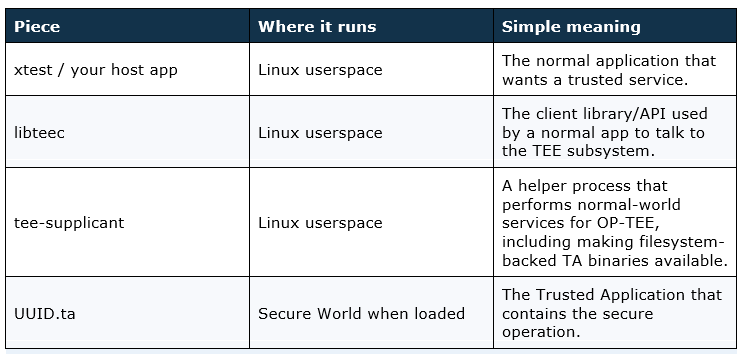
**Also remember /dev/tee0 **is the Linux device interface exposed by the kernel TEE framework. libteec uses the Linux TEE interface; you normally do not implement TrustZone switching yourself in the application.
7. xtest: The Best First Real Example
The optee-test package is useful because it already contains both sides of the architecture: a normal Linux test program called xtest and many Trusted Applications used by individual tests.
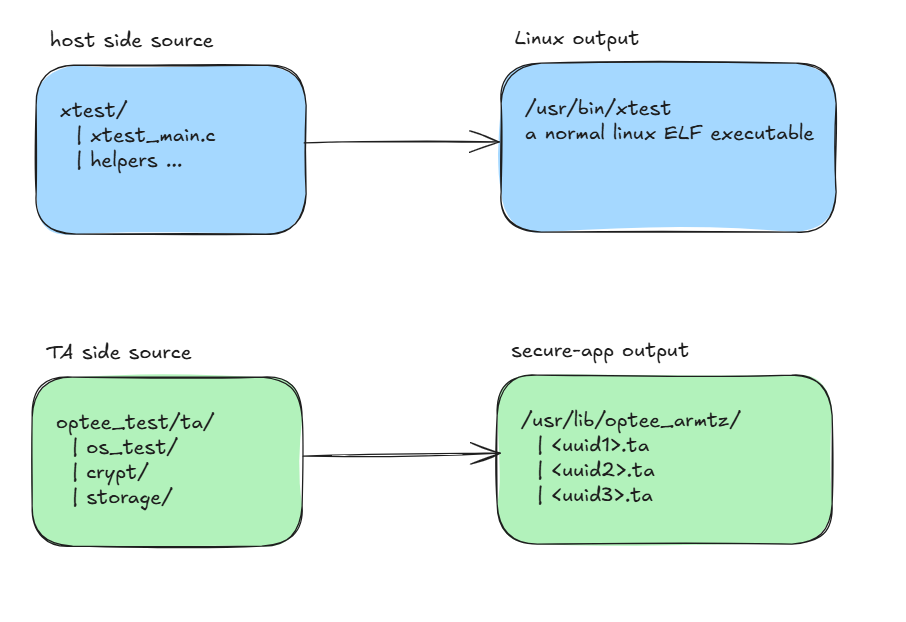
Figure 3 - optee-test source code and its two classes of outputs.
7.1 Host-side source becomes /usr/bin/xtest
The host-side xtest sources are ordinary C code compiled for Linux. They include the main program, test framework, regression test files, and code that uses the GlobalPlatform TEE Client API. The build produces the normal-world executable:
$ /usr/bin/xtest
Linux launches xtest exactly like any other command-line executable.
7.2 TA-side source becomes UUID.ta files
The TA directories contain Trusted Application sources. Each TA is built for the OP-TEE Trusted Application environment and receives a UUID. The build places the resulting TA binaries under:
/usr/lib/optee_armtz/<UUID>.ta
build contains multiple .ta files there, which is expected: different xtest cases need different Trusted Applications to test cryptography, storage, RPC behavior, core API behavior, and other TEE functionality.
8. Exactly What Happens When You Run xtest
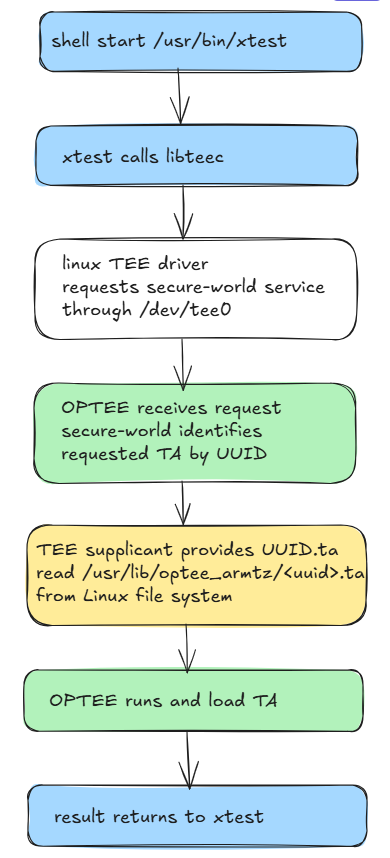
Figure 4 - End-to-end xtest request flow.
Step 1 - Linux starts xtest
root@device:~# xtest
The shell starts /usr/bin/xtest as a normal Linux process. At this point nothing magical has happened; this is the same kind of process launch as any other ELF program.
Step 2 - xtest chooses a test and opens a TEE context
A test uses libteec. Conceptually, it initializes access to the TEE subsystem and prepares to communicate with Secure World.
Step 3 - xtest opens a session to a specific TA UUID
The test knows which Trusted Application it needs. It calls TEEC_OpenSession with that TA UUID. This is the key link between host-side test code and one particular UUID.ta file.
Step 4 - the request crosses into Secure World
The Linux kernel TEE driver passes the request through the platform’s secure monitor mechanism. On ARMv8 systems, ARM Trusted Firmware participates in transitions between Normal and Secure World. OP-TEE receives the request in Secure World.
Step 5 - OP-TEE needs the TA binary
For a normal filesystem-backed user TA, OP-TEE requests help from tee-supplicant. tee-supplicant can access the Linux filesystem and locate the .ta matching the requested UUID.
/usr/lib/optee_armtz/<requested-uuid>.ta
Step 6 - the TA runs in Secure World
The TA is loaded by OP-TEE and its command handler executes in the trusted environment. The TA can use OP-TEE internal APIs rather than normal Linux system calls.
Step 7 - the result returns to xtest
The return value and output parameters travel back to the Linux process. xtest compares the result with the expected result, prints PASS/FAIL information, closes the session, and continues with the next test.
9. A Tiny Pseudo-Code Example
The following is intentionally simplified. It shows the relationship, not production-ready C code.
9.1 Linux host side
main() {
 print("Normal world: starting");

 TEEC_InitializeContext(...);
 TEEC_OpenSession(..., HELLO_TA_UUID, ...);
 TEEC_InvokeCommand(..., CMD_SAY_HELLO, ...);

 print("Normal world: command completed");
 }
9.2 Trusted Application side
TA_InvokeCommandEntryPoint(command_id, ...)
{
   if (command_id == CMD_SAY_HELLO){
     // This code executes under OP-TEE
     return TEE_SUCCESS;
    }
 }
You run only the host program from Linux. The TA is entered because the host opened a session and invoked a command.
10. Where OP-TEE Fits in Your i.MX8MP Boot
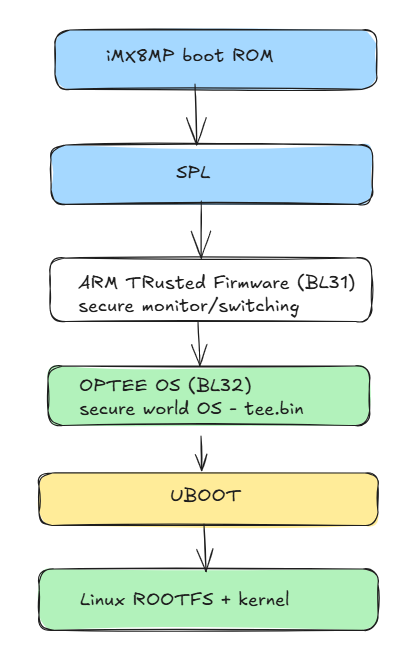
Figure 5 - Simplified i.MX8MP boot chain with OP-TEE.
In the build, enabling the optee machine feature makes the NXP imx-boot flow include OP-TEE as BL32. Your build also uses tee.bin as the OP-TEE boot image. This means OP-TEE is started as part of the secure boot firmware chain before Linux is available to run xtest.
**Do not confuse the two different files **tee.bin is the OP-TEE operating system image loaded during boot. UUID.ta files are individual Trusted Applications loaded later when Linux applications request them. They serve different purposes.
11. Your Current Yocto Status
At this stage of integration, the important build-side pieces are in place:
· MACHINE_FEATURES contains optee.
· DEPLOY_OPTEE is true.
· optee-os 3.19.0.imx builds successfully and produces tee.bin.
· optee-client builds successfully.
· optee-test now installs its host executable and Trusted Applications under usrmerge-compatible locations.
· Your optee-test image area shows /usr/bin/xtest and /usr/lib/optee_armtz/*.ta.
That proves the software components can be built. The next milestone is runtime verification on the actual i.MX8MP board after flashing.
11.1 What to check after flashing
 # Check that Linux found the OP-TEE driver
 dmesg | grep -i -E 'optee|tee'

 # Check Linux TEE devices
 ls -l /dev/tee*

 # Check tee-supplicant
 ps -ef | grep tee-supplicant

 # Run the test suite
 xtest
If xtest runs successfully, you will have proven the full chain from Linux host application to Secure World TA and back.
12. Common Beginner Questions
Q1. If I have a normal hello-world binary, does OP-TEE run it automatically?
No. A normal Linux binary remains a Linux binary. To use OP-TEE, you deliberately create or use a Trusted Application and make the Linux host application call it.
Q2. Do I manually execute a UUID.ta file?
No. You do not run it from bash. The host opens a session to its UUID; OP-TEE loads and runs the corresponding TA.
Q3. Why is the .ta file visible under /usr/lib if it is “secure”?
The file can live on normal storage. Its execution environment is what is protected. Production systems may additionally use TA signing/encryption or stronger storage arrangements, which will be covered in later parts.
Q4. Do all applications need libteec?
No. Only applications that consume a service implemented by a TA need to use the TEE Client API or a higher-level wrapper that uses it.
Q5. Does tee-supplicant itself run in Secure World?
No. tee-supplicant is a normal Linux userspace helper. OP-TEE asks it to perform services that require Normal-World resources such as filesystem access.
Q6. Is OP-TEE the same as TrustZone?
No. TrustZone is the ARM hardware/security architecture that creates the separation. OP-TEE is software that uses the Secure World provided by TrustZone.
13. Mental Model Summary
**The shortest correct model **Linux runs the big application. OP-TEE runs a small trusted service. The Linux application identifies the service by TA UUID, sends a command through libteec and the Linux TEE driver, OP-TEE runs the TA, and the result comes back.
Linux host app
 |
 | TEEC_OpenSession(UUID)
 | TEEC_InvokeCommand(...)
 v
 libteec -> Linux TEE driver -> OP-TEE -> UUID.ta
 |
 + - secure operation
 |
 Linux host app <- result ← - - - - - -+
Hello-world demo Yocto recipe: sirius-tee-hello
Stay tuned for Part-2 continued of exploring OPTEE and its further implementation.